Eploration of pOmpR in the registry

Author

Samuel Ortion

Published

September 25, 2023

Following the exploration of iGEM registry SQL dump in Querying iGEM Registry SQL Dump Intro, we explore further the sequences referenced as OmpR promoter.

select part_name, nickname from parts where nickname like "%ompr%";
Results Table
part_name nickname
BBa_R0082 OmpR
BBa_R0083 OmpR
BBa_R0084 OmpR
BBa_I761001 OmpR_BS
BBa_K2845038 OmpR-RFFF-
BBa_K2235007 OmpR Siali
BBa_K2845032 OmpR-FFF-N
BBa_K2845037 OmpR-RFR-N
BBa_K2845008 OmpR
BBa_K2845009 OmpR
BBa_K2845035 OmpR-FFF-N
BBa_K2845040 OmpR-RFFR-
BBa_K2845041 OmpR-RFFR-
BBa_K2845042 OmpR-FFFR-
BBa_K2845044 OmpR-FRFR-
select part_name, label from parts, parts_seq_features  where parts.part_id = parts_seq_features.part_id and parts_seq_features.label like "%ompr%promoter%";

Multiple alignment of OmpR promoter binding site - Reloaded

Alignment of OmpR binding site parts

Let’s align only the pOmpR binding site having their own basic part:

select part_name, label from parts, parts_seq_features  where parts.part_id = parts_seq_features.part_id and parts_seq_features.label like "%ompr%promoter%";
Results Table
part_name label
BBa_K1766005 OmpR dependent promoter
BBa_K1766007 OmpR dependent promoter
BBa_J100314 OmpR Scrambled promoter

Gather these results:

select part_name, label, nickname from parts, parts_seq_features  where parts.part_id = parts_seq_features.part_id and (
    parts_seq_features.label like "%ompr%" 
    or 
    parts.nickname like "%ompr%"
) group by part_name order by part_name asc

into outfile "sql_parts_like_OmpR.tsv";
database_directory="/var/lib/mysql/igem_registry"
sudo cp "${database_directory}/sql_parts_like_OmpR.tsv" ./tmp/sql/pOmpR/sql_parts_like_OmpR.tsv
copy_from_mysql() {
    local filename
    filename="$1"
    local database_directory
    database_directory="/var/lib/mysql/igem_registry"
    local local_directory
    local_directory="./tmp/sql"
    local local_filename
    local_filename="${local_directory}/${filename}"
    sudo mv "${database_directory}/${filename}" "${local_filename}"
    sudo chown $USER:$USER "${local_filename}"
}
copy_from_mysql sql_parts_like_OmpR.tsv
head ./tmp/sql/sql_parts_like_OmpR.tsv
./tmp/sql/sql\_parts\_like\_OmpR.tsv
BBa_E71103      C3 OmpR
BBa_I15022      C1 OmpR
BBa_I15025      C3 OmpR
BBa_I15026      C3 OmpR
BBa_I3000       C1 OmpR
BBa_I3001       C1 OmpR
BBa_I3002       C1 OmpR
BBa_I3300       C1 OmpR
BBa_I3301       C1 OmpR
BBa_I3302       F1 OmpR
wc -l ./tmp/sql/sql_parts_like_OmpR.tsv

266

Retrieving the sequences of the basic parts parts having label OmpR:

select part_name, nickname, sequence from parts where parts.nickname like "%ompr%"
group by part_name order by part_name asc

into outfile "sql_basic_parts_like_ompr.tsv" 
FIELDS TERMINATED BY ';';

copy_from_mysql

Convertion from csv into fasta.

awk 'FS = ";" { printf ">%s %s\n", $1, $2; print $3}' ./tmp/sql/sql_basic_parts_like_ompr.tsv > ./tmp/sql/sql_basic_parts_like_ompr.fasta

blast alignments

Install using mamba from bioconda.

mamba install -c biocore blast-plus

Local database creation

makeblastdb -in ./tmp/sql/sql_basic_parts_like_ompr.fasta -parse_seqids -dbtype nucl -out ./tmp/blast/db/parts_like_ompr

Adding sequences from FASTA; added 14 sequences in 0.00273395 seconds.

Query BBa_R0082 against theses sequences:

blastn -query ./data/pOmpR/seq/BBa_R0082.fasta -db ./tmp/blast/db/parts_like_ompr -outfmt 7 -out ./results/pOmpR/blast/pOmpR-like-vs-BBa_R0082.blast
# BLASTN 2.2.31+
# Query: BBa_R0082
# Database: ./tmp/blast/db/parts_like_ompr
# Fields: query id, subject id, % identity, alignment length, mismatches, gap opens, q. start, q. end, s. start, s. end, evalue, bit score
# 4 hits found
BBa_R0082   BBa_R0082   100.00  108 0   0   1   108 1   108 8e-55   200
BBa_R0082   BBa_K2235007    100.00  108 0   0   1   108 1   108 8e-55   200
BBa_R0082   BBa_R0083   100.00  36  0   0   1   36  1   36  8e-15   67.6
BBa_R0082   BBa_R0083   100.00  35  0   0   74  108 44  78  3e-14   65.8
# BLAST processed 1 queries

Only BBa_K2235007 seems to match on the other pOmpR sequences (BBa_R0082 and BBa_R0083, not BBa_R0084).

Erratum: several OmpR labelled parts are probably the coding sequence of the protein regulatory trans element of same name. It is expected that no hit is found between these coding sequence and its DNA binding site.

Using Google Search results

Using SEOquake extension it is possible to export the google search results as a csv.

Used query:

site:parts.igem.org "ompr"

the resulting file, once extracted the urls is as follows:

./data/pOmpR/google\_results\_ompr.csv
http://parts.igem.org/Part:BBa_K1731000
http://parts.igem.org/Part:BBa_K3576003
http://parts.igem.org/Part:BBa_R0082
http://parts.igem.org/Part:BBa_K1886006
http://parts.igem.org/Part:BBa_K1647007
http://parts.igem.org/Part:BBa_K1017101
http://parts.igem.org/Part:BBa_K2845037
http://parts.igem.org/Part:BBa_K1486056
http://parts.igem.org/Part:BBa_K621001
http://parts.igem.org/Part:BBa_K2235007
...

Let’s retrieve only the BBa identifiers:

awk '
BEGIN {
    FS="/"
}
$4 ~ /^Part:[^:]/ {
    BBa_id=$4
    gsub("Part:", "", BBa_id)
    split(BBa_id, a, ":")
    print a[1]
}' ./data/pOmpR/google_results_ompr.csv | sort | uniq > ./data/pOmpR/google_results_part_name.lst

Retrieve the sequences

Based on theses part_name we want to retrieve the sequence, of all those that have part_type being Regulatory.

  1. Create a temporary table with the csv content:
CREATE TABLE IF NOT EXISTS google_pompr_parts (
    `part_name` varchar(255) DEFAULT NULL UNIQUE
);

Load the csv:

sudo cp -i ./data/pOmpR/google_results_part_name.lst /var/lib/mysql/google_results_part_name.csv
LOAD DATA INFILE './google_results_part_name.csv'
INTO TABLE google_pompr_parts
FIELDS TERMINATED BY ','
ENCLOSED BY '"'
LINES TERMINATED BY '\n';

93 rows affected.

Select the BBa_ID that corresponds to Regulatory parts:

select parts.part_name, nickname
from parts
inner join google_pompr_parts
on parts.part_name = google_pompr_parts.part_name
where parts.part_type = "Regulatory";
Results Table
part_name nickname
BBa_I761011
BBa_J64982
BBa_K116500
BBa_K1315008
BBa_K136004
BBa_K1913023
BBa_K239001
BBa_K342003
BBa_K395302
BBa_K395303 PompC-CS1
BBa_K4281017
BBa_K737067
BBa_R0062 lux pR
BBa_R0082 OmpR
BBa_R0083 OmpR
BBa_R0084 OmpR

Sequences extraction to FASTA

select parts.part_name, nickname, sequence
from parts
inner join google_pompr_parts
on parts.part_name = google_pompr_parts.part_name
where parts.part_type = "Regulatory"

into outfile "google_pompr_regulatory.csv";
sudo mv /var/lib/mysql/igem_registry/google_pompr_regulatory.csv ./data/pOmpR/google_pompr_regulatory.csv
sudo chown $USER:$USER ./data/pOmpR/google_pompr_regulatory.csv
./bin/csv_to_fasta.awk ./data/pOmpR/google_pompr_regulatory.csv > ./data/pOmpR/google_pompr_regulatory.fasta

Alignment

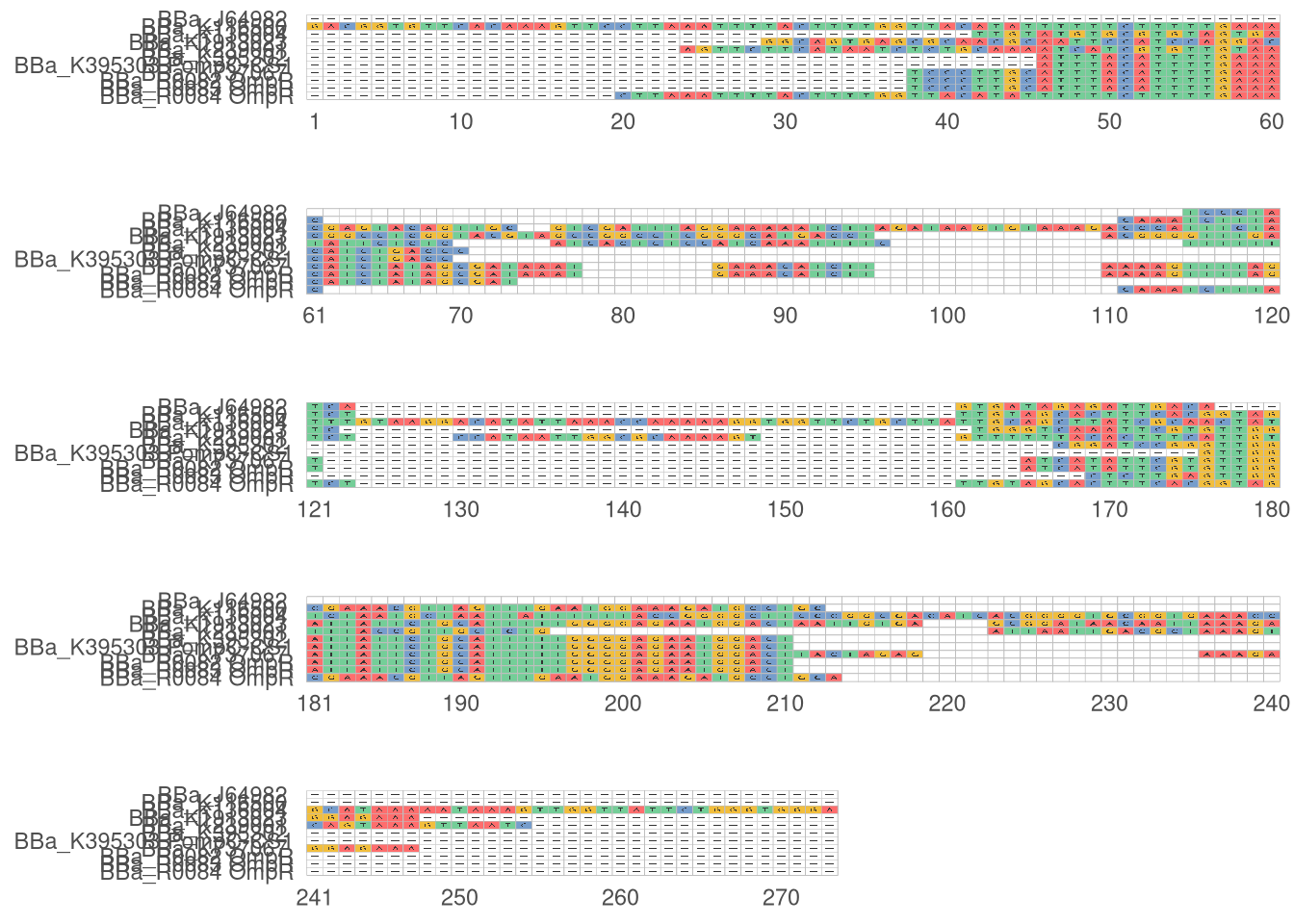
To improve the reproducibility and ease the alignment, Nextflow script is written in ./workflow/musclor.nf, that goes through all steps specified in previous bash function musclor.

To run:

nextflow run ./workflow/musclor.nf --name=google_pompr_regulatory --input  ./data/pOmpR/google_pompr_regulatory.fasta --outdir ./results/pOmpR/musclor

The result html plot is available here

ggmsa plot mafft

mafft ./data/pOmpR/google_pompr_regulatory.fasta > ./results/pOmpR/google_pompr_regulatory.mafft.afa

Subsample the csv file to filterout the protein OmpR sequences

awk '
BEGIN {
    FS = "\t"
    exclude["BBa_K342003"] = 1
    exclude["BBa_K4281017"] = 1
    exclude["BBa_K1315008"] = 1
    exclude["BBa_R0062"] = 1
    exclude["BBa_I761011"] = 1
}
{
    BBa_id = $1
    if (BBa_id in exclude) {
    # print(BBa_id)
    } else {
        print $0
    }
}
' ./data/pOmpR/google_pompr_regulatory.csv > ./data/pOmpR/google_pompr_regulatory_f.csv
./bin/csv_to_fasta.awk ./data/pOmpR/google_pompr_regulatory_f.csv > ./data/pOmpR/google_pompr_regulatory_f.fasta
mafft ./data/pOmpR/google_pompr_regulatory_f.fasta > ./results/pOmpR/google_pompr_regulatory_f.mafft.afa
library(ggmsa)
Registered S3 methods overwritten by 'ggalt':
  method                  from   
  grid.draw.absoluteGrob  ggplot2
  grobHeight.absoluteGrob ggplot2
  grobWidth.absoluteGrob  ggplot2
  grobX.absoluteGrob      ggplot2
  grobY.absoluteGrob      ggplot2
Registered S3 methods overwritten by 'treeio':
  method              from    
  MRCA.phylo          tidytree
  MRCA.treedata       tidytree
  Nnode.treedata      tidytree
  Ntip.treedata       tidytree
  ancestor.phylo      tidytree
  ancestor.treedata   tidytree
  child.phylo         tidytree
  child.treedata      tidytree
  full_join.phylo     tidytree
  full_join.treedata  tidytree
  groupClade.phylo    tidytree
  groupClade.treedata tidytree
  groupOTU.phylo      tidytree
  groupOTU.treedata   tidytree
  inner_join.phylo    tidytree
  inner_join.treedata tidytree
  is.rooted.treedata  tidytree
  nodeid.phylo        tidytree
  nodeid.treedata     tidytree
  nodelab.phylo       tidytree
  nodelab.treedata    tidytree
  offspring.phylo     tidytree
  offspring.treedata  tidytree
  parent.phylo        tidytree
  parent.treedata     tidytree
  root.treedata       tidytree
  rootnode.phylo      tidytree
  sibling.phylo       tidytree
ggmsa v1.6.0  Document: http://yulab-smu.top/ggmsa/

If you use ggmsa in published research, please cite:
L Zhou, T Feng, S Xu, F Gao, TT Lam, Q Wang, T Wu, H Huang, L Zhan, L Li, Y Guan, Z Dai*, G Yu* ggmsa: a visual exploration tool for multiple sequence alignment and associated data. Briefings in Bioinformatics. DOI:10.1093/bib/bbac222
library(ggplot2)

How many sequences aligned?

grep -c ">" ./results/pOmpR/google_pompr_regulatory_f.mafft.afa

11

sequences <- "../results/pOmpR/google_pompr_regulatory_f.mafft.afa"
ggmsa(sequences, color="Chemistry_NT", font="DroidSansMono", char_width=0.5, seq_name=TRUE) + facet_msa(field=60)
Scale for x is already present.
Adding another scale for x, which will replace the existing scale.
Coordinate system already present. Adding new coordinate system, which will
replace the existing one.
# ggsave("media/plots/ggmsa_mafft.svg")